LED Flow Star Setup

Load · Light · Charge

Your Flow Star has eight zipper pockets, one for each LED. Load the lights, switch them on through the fabric, and charge all eight at once with the 10-cord charger.

  1. 1 Load the LEDs 8 pockets
  2. 2 Light it up One button · 19 modes
  3. 3 Charge All 8 at once

What's In The Box

Check you have everything

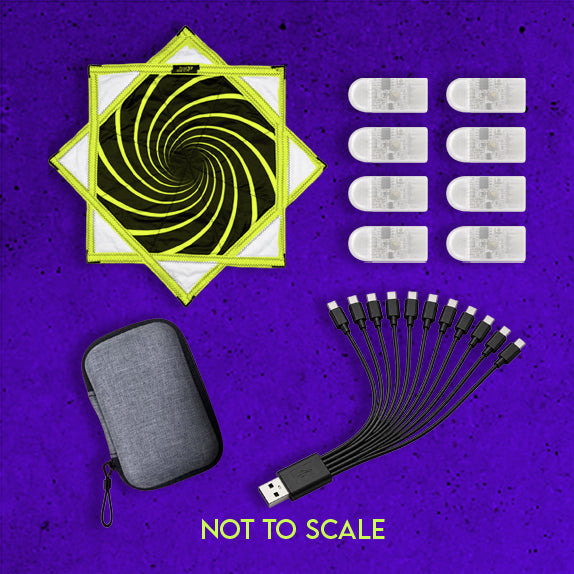
  • LED Pocket Flow Star8 zipper pockets, one inner sleeve in each
  • 8 Removable LED LightsOne per pocket, USB-C on every module
  • 10-cord USB-C chargerCharges all 8 lights at once
  • Custom EVA hard caseStores the lights and charger
LED Flow Star kit: star, eight LED modules, EVA case and 10-cord charger

Step 1

Load The LEDs

8 pockets · 1 light each

  1. 1
    Unzip a pocket

    Open one of the eight zipper pockets on the star.

  2. 2
    Find the inner sleeve

    Inside is a smaller pocket. It holds the light in place while you flow.

  3. 3
    Slide the LED in

    Push the LED all the way into the sleeve, facing up. The exact angle doesn't matter and it may turn a little while you flow.

  4. 4
    Zip it closed

    Close the pocket fully so the light can't work its way out.

  5. 5
    Repeat for all 8

    Once every pocket is loaded, you're ready to switch on.

Step 2

How To Use

Simple One-Button Controls

Turn on

Hold 2 seconds

Change mode

Click once

Lock mode

Hold 1 second

Turn off

Hold 2 seconds

Through the fabric

Press through the pocket

No need to unzip. Feel for the button through the fabric and press with your thumb. All the controls above work the same way.

Matching

Set all 8 to match

Each LED has its own button. Turn all eight on, then click each one to the same mode. Each light remembers the mode it was turned off in, so next time they come back on matching. Or mix modes pocket by pocket for your own pattern.

Before you flow

Lock it in

Once a light is on the mode you want, hold 1 second to lock it. A bump or a catch mid-flow won't change it. Hold 1 second again to unlock.

RGB Modes

  • 1 RGB Flash
  • 2 RGB Strobe
  • 3 RGB Strobe 2

Solid Colors

  • 4 Pink
  • 5 Red
  • 6 Orange
  • 7 Yellow
  • 8 Green
  • 9 Blue
  • 10 Purple
  • 11 White

Color Strobes

  • 12 Pink
  • 13 Red
  • 14 Orange
  • 15 Yellow
  • 16 Green
  • 17 Blue
  • 18 Purple
  • 19 White

Step 3

Charge

All 8 at once

  1. 1
    Take the lights out

    Unzip each pocket and slide the LEDs out. They need to come out of the star to charge.

  2. 2
    Plug in the charger

    The charger ends in a standard USB-A plug. Use any USB wall adapter, laptop or power bank.

  3. 3
    Connect all 8 LEDs

    Plug one USB-C cord into each light. The two extra cords are spares.

  4. 4
    Watch for the red light

    A red light turns on while each LED charges and turns off when it's full. Charging is quick.

  5. 5
    Load up and flow

    Put the lights back in their pockets. A full charge runs 4-6+ hours depending on the mode. Strobes last longer than solid colors.

Eight LED modules plugged into the 10-cord USB-C charger
4-6+ hrs Per charge, by mode
8 at once 10-cord charger
USB-C On every module

Store & Swap

Your lights move with you

  1. 1
    Take the lights out

    Unzip each pocket and slide the LED out of its sleeve.

  2. 2
    Pack them in the case

    The EVA hard case keeps all eight lights and the charger together.

  3. 3
    Hand wash the star

    With every LED removed, hand wash only. Full steps in our Flow Star care guide.

Designed To Grow With Your Collection

Your eight LEDs aren't locked into one Flow Star. Future LED-compatible Flow Stars will be sold without lights, so you can load this same set into a new design using the steps above.

Keep your lights. Add new stars for much less.

Troubleshooting

Quick fixes for the most common questions.

A light won't turn on

Hold the button a full 2 seconds. If nothing happens, charge that light until its red light turns off, then try again.

My mode keeps changing while I flow

Lock each light before you start: hold the button 1 second once you're on the mode you want. Hold 1 second again to unlock.

My lights don't match when I turn them on

Each light starts in the mode it was turned off in. Click each one to the same mode, and they'll stay matched next time.

One light is dimmer than the others

It's likely low on battery. Charge all eight together so they start even. Solid colors drain faster than strobes, so lights on different modes will run down at different rates.

The LED won't slide into the sleeve

Make sure you're using the smaller inner sleeve, not the outer zipper pocket, and push it in straight.

Still not working?Every LED has a 6-month warranty. We'll replace a light that fails.

Warranty & Support